Accessibility
Microsoft Accessibility Checker
Last modified 8/13/2025
Before uploading or sharing your Microsoft document (Word, Excel, PowerPoint), run the Accessibility Checker to review for accessibility. Microsoft’s tool typically flags issues categorized into Errors, Warnings, Tips. Below are some issues flagged by the Accessibility Checker. Remember, not every Accessibility Checker checks for the same issues throughout all the Microsoft Products. For a comprehensive list, check out the Microsoft's Rules for the Accessibility Checker.
What it checks For
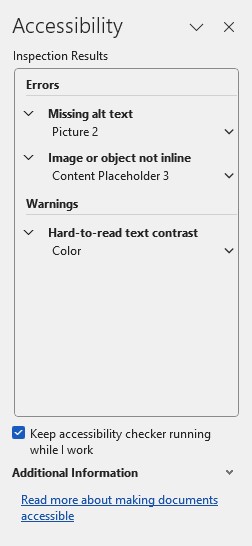
Errors
Errors are must fix accessibility issues. These critical issues cause serious barriers for accessibility.
- Missing or inappropriate alt text for non‑text content (images, charts, etc.)—alt text must not include image names or file extensions.
- If an alt text is suggested by image recognition, you should review and edit for accuracy.
- Tables without header information—screen readers rely on header rows to interpret table data.
- Unnamed or default sections in PowerPoint—sections need meaningful names for navigation.
- Slides lacking titles— Slide titles in PowerPoint help users navigate presentations.
- Excel worksheets using red‑only formatting for negative numbers—color alone shouldn't convey meaning.
- Objects (images/graphics) not set inline in Word (excluding headers/footers)—this can confuse assistive technology.
- Content restrictions that block programmatic access—this prevents screen readers from accessing content.
- Content controls (like form fields) without titles—titles are needed for clarity.
Warnings
Microsoft notes warning as issues that should be fixed, but several of the issues listed as a warning can These often help make for better experiences.
- Complex tables (merged, split, nested cells) that hinder navigation.
- Sheet tabs in Excel without descriptive names—defaults like “Sheet1” are not helpful.
- Low color contrast between text and background affects readability.
- Missing closed captions on audio/video content for inserted audio and video in PowerPoint, OneNote.
- Unlogical reading order in PowerPoint—presentation elements must follow a logical tab/reading sequence.
Tips
Tips are best practice suggestions to help improve usability of the document.
- Unique section names in PowerPoint to aid navigation.
- Unique Power Point slide titles for easy reference.
- Consistent use of heading styles or Table of Contents in Word to structure content clearly.
What it doesn’t detect
All accessibility checkers have limitations and still require a manual review of the content. Microsoft is no different. Here are some issues you should manually check for.
- Color alone conveying information (e.g., formatting by color without text).
- Poor contrast or subtle visual issues—though contrast warnings exist, nuanced color issues might be missed.
- Unformatted lists (bulleted/ordered lists not explicitly marked as lists).
- Text size that's too small or using hard-to-read fonts—no tool-based alerts for font size.
- Missing alt text on tables or graphs, even if they’re images—must check manually.
- Contextual structure needs, like heading hierarchy or extra whitespace—Checker can't fully understand context.
- Videos with open or burned-in captions might not be recognized as captioned.
- False positives—some flagged issues may not be actual barriers (e.g., design elements using color that don’t convey meaning).
How to find the Accessibility Checker
Open your Word, Excel, or PowerPoint file.
Go to the Review tab on the Ribbon.
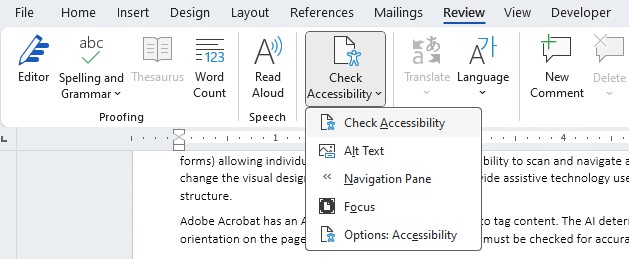
Click Check Accessibility. The Accessibility pane appear on the right, showing issues grouped by severity (Errors, Warnings, Tips).
Note: PowerPoint also includes a Reading Order Pane, useful for adjusting how slide content is read by screen readers.
Keep the checker running
Enable the Real-Time Accessibility Checker
For Windows
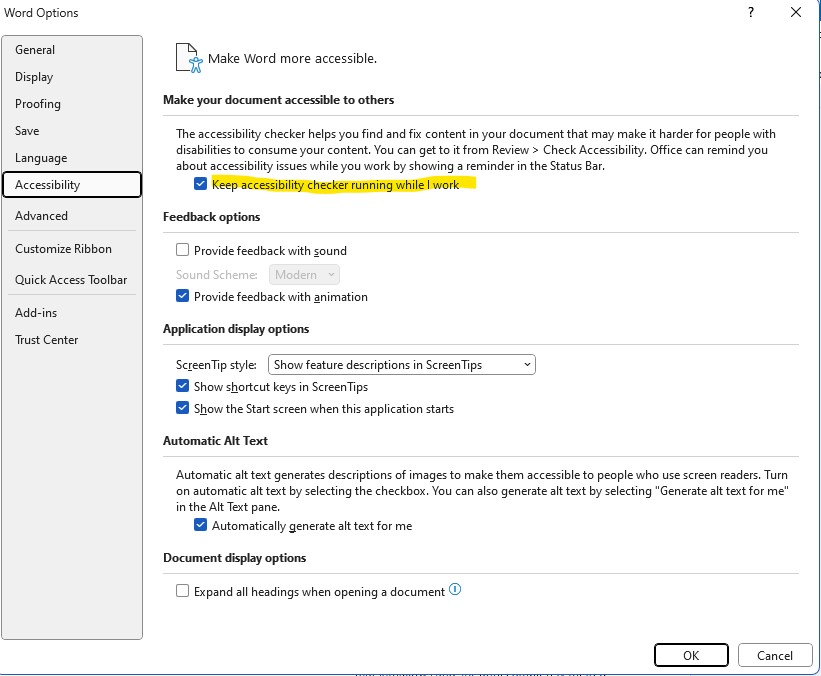
Go to File > Options > Accessibility (or Ease of Access)
Check Keep accessibility checker running while I work
For Mac:
Go to Word/Excel/PowerPoint > Preferences > Accessibility
Enable Keep accessibility checker running while I work
Resources
Feedback
To suggest an update to this article, ISU students, faculty, and staff should submit an Update Knowledge/Help Article request and all others should use the Get IT Help form.