Technology
Find Your EMPLID
Last modified 11/14/2024
This article will explain where to find your Employee ID (EMPLID) number. More information about your EMPLID is explained here: EmplID
How to find your EMPLID
- Log in to My.IllinoisState.edu or CS.IllinoisState.edu via Central Login.
- For more information about Central Login at ISU, please refer to: Central Login
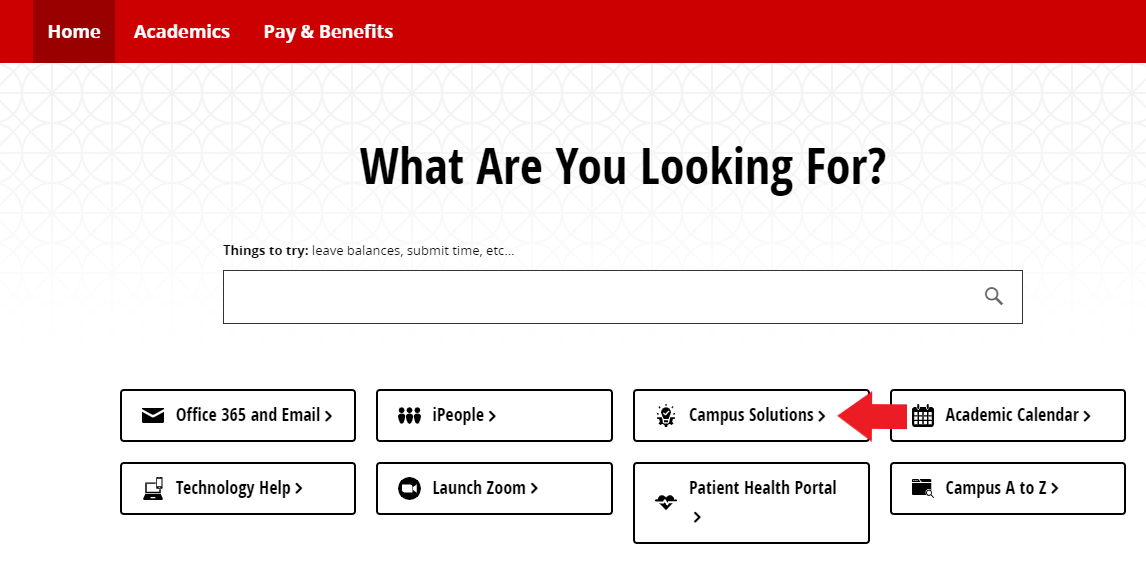
- If you are a faculty/staff member, select the Campus Solutions button. If you are a student, select the Student Center button.
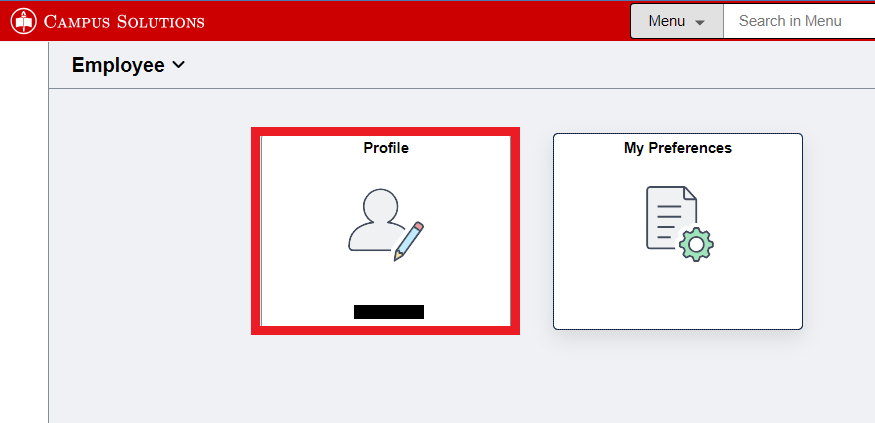
- Select the Profile tile.
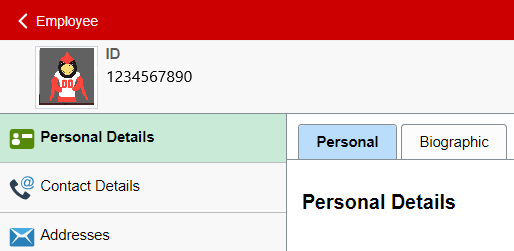
- Your EMPLID is the number in the upper left corner next to your profile image under ID.
How to Get Help
Technical assistance is available through the Illinois State University Technology Support Center at:
- Phone: (309) 438-4357
- Email: SupportCenter@IllinoisState.edu
- Submit a Request via Web Form: Help.IllinoisState.edu/get-it-help
- Live Chat: Help.IllinoisState.edu/get-it-help
Feedback
To suggest an update to this article, ISU students, faculty, and staff should submit an Update Knowledge/Help Article request and all others should use the Get IT Help form.