Technology
Changing a Qualtrics Account Time Zone
Last modified 11/20/2024
1) Log in to illinoisstate.qualtrics.com via Central Login.
- For more information about Central Login at ISU, please refer to: Central Login
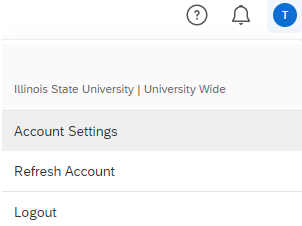
3) Click on the colored circle at the top-right of the screen and click on 'Account Settings'.
4) Change the time zone to your preferred time zone. Illinois State University is in UTC - 06:00 - Central Time (US & Canada)
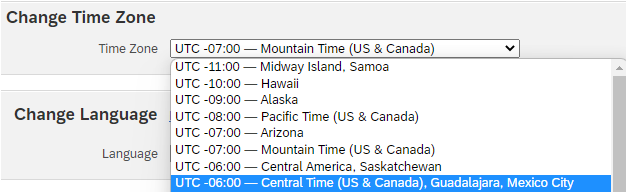
*The setting will save automatically.
Still Need Assistance?
Technical assistance is available through the Illinois State University Technology Support Center at:
- Phone: (309) 438-4357
- Email: SupportCenter@IllinoisState.edu
- Submit a Request via Web Form: Help.IllinoisState.edu/get-it-help
- Live Chat: Help.IllinoisState.edu/get-it-help
Feedback
To suggest an update to this article, ISU students, faculty, and staff should submit an Update Knowledge/Help Article request and all others should use the Get IT Help form.